Showing posts with label book. Show all posts
Showing posts with label book. Show all posts

Nov 15, 2013
Введение в операционные системы - Столяров А.В.
http://www.stolyarov.info
Мультизадачность


Мультизадачность
- Пакетный режим
- Режим разделения времени
- Планирование в режме реального времени
Требования к аппаратуре
- Аппарат прерываний
- Защита памяти
- Привилегированный и ограниченный режимы
- Таймер

Прерывания
- Аппаратные (внешние)
- Внутренние (в процессоре на исключительные ситуации, например деление на ноль)
- Программные (системные вызовы)
Эмуляция физического компьютера возможна за счет эмитации прерываний.
Проблемы решаемые менеджером памяти:
- защита процессов др. от др. и от ОС. управление аппаратной защитой памяти
- откачка при недостатке объема опертивной памяти
- дублирование данных при, например, запуске нескольких копий программы
- перемещение кода
- фрагментация
Виртуальная память
- база и предел
- сегментная организация
- страничная
- сегментно-страничная

Драйверы (в ядре, при запуске, динамич. загружаемые), контроллеры как средства абстрагирования, буфера ввода-вывода (асинхронный режим)
 Ввод-вывод


Процессы


 Файловая система


Директория (имена файлов и их номера)
Файл. Индексный дескрптор (i-node или index node) - вся информация (права, дата...)
Ссылка (счетчик ссылок на i-node)
Семафоры и мьютексы
Мьютексы lock() unlock()
Семафоры up() увелич. некот знач. на 1; down()
Должны быть реализоваы атомарно
Графический интурфейс
Х-сервер
Nov 13, 2013
Программирование на языке ассемблера NASM для ОС Unix - Столяров А.М.
http://www.stolyarov.info/books/asm_unix
Кольца защиты процессора

 Стек используется при вызовах подпрограмм для хранения адресов возврата, для передачи фактических параметров в подпрограммы и для хранения локальных переменных

Макросы

 Аппаратная поддержка мультизадачности:
Кольца защиты процессора
nasm -f elf hello.asm
ld -m elf_i386 hello.o -o hello
./hello
%include "stud_io.inc"
global _start
section .data
string resb 20
count resw 256
x resd 1
fibon dw 1, 1, 2, 3, 5, 8, 13, 21
msg db "Hello World"
section .bss
set512 resd 16
section .text
_start: mov eax, 0
mov eax, ebx
mov eax, [count] ; значение count в eax
mov eax, count ; адрес count в eax
mov eax, [ebx] ; из ячейки памяти с адресом ebx
; Арифметика
add edx, 12
sub [x], ecx
inc eax
dec eax
; Безусловные переходы
jmp some_label
jmp eax
jmp [eax]
jmp short some_label
; Условные переходы
some_label: cmp eax, 5
je equal_label
jl less_label
jng not_greater_label
jnz some_label
; Циклы
mov ecx, 100
mov esi, array
mov eax, 0
lp: add eax, [esi]
add esi, 4
loop lp
; Побитовые xor, or, and
xor eax, eax
; Операции сдвига shr (shift right), shl (shift left)
shr edx, 5
 Стек используется при вызовах подпрограмм для хранения адресов возврата, для передачи фактических параметров в подпрограммы и для хранения локальных переменных
 push eax
pop eax
pushad ; push all doublewords
popad ; для всех регистров: EAX, ECX, EDX, EBX, ESP, EBP, ESI, EDI
pushfd ; для регистра флагов EFLAGS
popfd; fill memory (edi=address, ecx=length, al=value)
fill_memory:
jecxz fm_q
fm_lp: mov [edi], al
inc edi
loop fm_lp
fm_q: ret
; Использование
mov edi, my_array
mov ecx, 256
mov al, '@'
call fill_memory
        push ebp
        mov ebp, esp
        mov esp, 16 ; 16 - объем памяти под локальные переменные

; после подпрограммы
        mov esp, ebp
        pop ebp
        ret
Макросы

%macro pcall1 2 ; 2 кол-во параметров
        push %2
        call %1
        add esp, 4
%endmacro

; вызов
pcall1 proc, eax


%define arg1 ebp+8

; вызов
        mov eax, [arg1]


%ifdef DEBUG_PRINT
        PRINT "Entering"
%endifnasm -f elf -dDEBUG_PRINT hello.asm
- аппарат прерываний
- защита памяти
- привилегированный и ограниченный режим работы центрального процессора
- таймер
int 80h ; Прерывание- Запрос прерывания
- Процессор доводит выполнение текущ программы до точки в кот можно прервать. На шине выставляет подтверждене прерывания. Др. прерывания блокируются
- Устройство передает число идентифицирующие данное устройство - номер прерывания
- Процессор сохраняет в стеке активной задачи счетчик комманд и регистр флагов
- Устанавливается привилег. режим центр. процессора. Управление передается на точку входа обработчика прерываний (процедуры операционной системы). Адрес процедуры в спец. области памяти
Mar 4, 2013
Linux From Scratch Book
Linux From Scratch (LFS) is a project that provides you with step-by-step instructions for building your own customized Linux system entirely from source.
http://www.linuxfromscratch.org/lfs/
http://www.linuxfromscratch.org/lfs/downloads/stable/
http://www.linuxfromscratch.org/lfs/
http://www.linuxfromscratch.org/lfs/downloads/stable/


Feb 18, 2013
Managing Projects with GNU Make - Robert Mecklenburg - 2009
# Standard phony targets
Target | Function
----------|--------------------------------------------------------------------
all | Perform all tasks to build the application
install | Create an installation of the application from the compiled binaries
clean | Delete the binary files generated from sources
distclean | Delete all the generated files that were not in the original source distribution
TAGS | Create a tags table for use by editors
info | Create GNU info files from their Texinfo sources
check | Run any tests associated with this application
# Automatic Variables
$@ | The filename representing the target.
$% | The filename element of an archive member specification.
$< | The filename of the first prerequisite.
$? | The names of all prerequisites that are newer than the target, separated by spaces.
$^ | The filenames of all the prerequisites, separated by spaces. This list has duplicate
| filenames removed since for most uses, such as compiling, copying, etc., duplicates are not wanted.
$+ | Similar to $^, this is the names of all the prerequisites separated by spaces, except
| that $+ includes duplicates. This variable was created for specific situations such
| as arguments to linkers where duplicate values have meaning.
$* | The stem of the target filename. A stem is typically a filename without its suffix.
| (We’ll discuss how stems are computed later in the section “Pattern Rules.”) Its use
| outside of pattern rules is discouraged.
VPATH = src
vpath pattern directory-list
vpath %.c src
# Special Targets
.INTERMEDIATE
Prerequisites of this special target are treated as intermediate files. If make creates
the file while updating another target, the file will be deleted automatically when
make exits. If the file already exists when make considers updating the file, the file
will not be deleted.
This can be very useful when building custom rule chains. For instance, most
Java tools accept Windows-like file lists. Creating rules to build the file lists and
marking their output files as intermediate allows make to clean up many temporary files.
.SECONDARY
Prerequisites of this special target are treated as intermediate files but are never
automatically deleted. The most common use of .SECONDARY is to mark object
files stored in libraries. Normally these object files will be deleted as soon as they
are added to an archive. Sometimes it is more convenient during development to
keep these object files, but still use the make support for updating archives.
.PRECIOUS
When make is interrupted during execution, it may delete the target file it is
updating if the file was modified since make started. This is so make doesn't leave
a partially constructed (possibly corrupt) file laying around in the build tree.
There are times when you don't want this behavior, particularly if the file is large
and computationally expensive to create. If you mark the file as precious, make
will never delete the file if interrupted.
Use of .PRECIOUS is relatively rare, but when it is needed it is often a life saver.
Note that make will not perform an automatic delete if the commands of a rule
generate an error. It does so only when interrupted by a signal.
.DELETE_ON_ERROR
This is sort of the opposite of .PRECIOUS. Marking a target as .DELETE_ON_ERROR
says that make should delete the target if any of the commands associated with
the rule generates an error. make normally only deletes the target if it is interrupted by a signal.
target...: variable = value
target...: variable := value
target...: variable += value
target...: variable ?= value
--include-dir (or -I)
-include i-may-not-exist.mk
@echo "$(MAKE_VERSION)"
--directory (-C)
@echo "$(CURDIR)"
@echo "$(MAKECMDGOALS)"
@echo "$(MAKEFILE_LIST)"
@echo "$(.VARIABLES)"
# String Functions
$(filter pattern... ,text)
$(filter-out pattern... ,text)
$(findstring string,text)
$(subst search-string,replace-string,text)
$(patsubst search-pattern,replace-pattern,text)
$(words text)
$(word n,text)
$(firstword text)
$(wordlist start,end,text)
# Important Miscellaneous Functions
$(sort list)
$(shell command)
# Filename Functions
$(wildcard pattern...)
$(dir list...)
$(notdir name...)
$(suffix name...)
$(basename name...)
$(addsuffix suffix,name...)
$(addprefix prefix,name...)
$(join prefix-list,suffix-list)
# Flow Control
$(if condition,then-part,else-part)
$(error text)
$(foreach variable,list,body)
# Less Important Miscellaneous Functions
$(strip text)
$(origin variable)
$(warning text)
@ | Do not echo the command. For historical compatibility, you can make your tar-
| get a prerequisite of the special target .SILENT if you want all of its commands to
| be hidden. Using @ is preferred, however, because it can be applied to individual
| commands within a command script. If you want to apply this modifier to all
| targets (although it is hard to imagine why), you can use the --silent (or -s)
| option.
|
- | The dash prefix indicates that errors in the command should be ignored by make.
| By default, when make executes a command, it examines the exit status of the
| program or pipeline, and if a nonzero (failure) exit status is returned, make termi-
| nates execution of the remainder of the command script and exits. This modi-
| fier directs make to ignore the exit status of the modified line and continue as if
| no error occurred.
|
+ | The plus modifier tells make to execute the command even if the --just-print (or
| -n) command-line option is given to make. It is used when writing recursive
| makefiles.
# Debugging
--just-print -p
--print-data-base -n
--warn-undefined-variables
Feb 4, 2013
The Linux Command Line: A Complete Introduction, William E. Shotts Jr. - 2012
& |    && ||    (cd interior && pwd) && pwd    autocd    C+A+F7
> file1    2>&1    &>    cat>file2    tee    cat <<- EOF
apropos    alias
kill -1 apache2   pstree    vmstat 5
dpkg -s solr-common    dpkg -S solr
lftp    scp    sftp    ftp <<- EOF
cat -A foo.txt   sort -k 3.7nbr -k 3.1nbr -k 3.4nbr distros.txt
cut    paste    join
nl    fold    pr
{ ls -l; cat f.txt; } > o.txt
read < <(echo "foo") trap async-child & mkfifo pipe1Jan 7, 2013
Head First C - David Griffiths
Exit status of last program
echo $?
&x - location in memory of x variable
You can also call sizeof for a data type, such as sizeof(int).
You can declare a char pointer as const char * to prevent the code from using it to modify a string.
man strstr
info coreutils 'printf'
Q: But what if I want to pass negative numbers as command-line arguments like set_temperature -c -4? Won’t it think that the 4 is an option, not an argument?
A: In order to avoid ambiguity, you can split your main arguments from the options using --. So you would write set_temperature -c -- -4. getopt() will stop reading options when it sees the --, so the rest of the line will be read as simple arguments.
(./bermuda | ./geo2json) < spooky.csv > output.json
If you genuinely want to share variables, you should declare them in your header file and prefix them with the keyword extern:
extern int passcode;
make takes away a lot of the pain of compiling files. But if you find that even it is not automatic enough, take a look at a tool called autoconf
The make tool can do far, far more than we have space to discuss here. To find out more about make and what it can do for you, visit the GNU Make Manual
Remember: when you're assigning struct variables, you are telling the computer to copy data.
If you use the typedef command, you can normally skip giving the struct a proper name. But in a recursive structure, you need to include a pointer to the same type. C syntax won't let you use the typedef alias, so you need to give the struct a proper name. That's why the struct here is called struct island.
The nm command lists the names that are stored inside the archive.
nm /usr/lib/libruby1.8-static.a
When you bind a socket to a port, the operating system will prevent anything else from rebinding to it for the next 30 seconds or so, and that includes the program that bound the port in the first place. Use reuse option (p. 477)
MUT-EX = MUTually EXclusive.
The make tool knows quite a lot about C compilation, and it can use implicit rules to build files without you telling it exactly how. For example, if you have a file called fred.c, you can compile it without a makefile by typing:
> make fred
cc fred.c -o fred


Purchase at Amazon
https://bitbucket.org/st1tch/head-first-c
Author repository: https://github.com/dogriffiths/HeadFirstC
Dec 5, 2012
Practical Load Balancing - Peter Membrey, David Hows, Eelco Plugge - 2012
Content caching
Proxy
squid http://en.wikipedia.org/wiki/Squid_(software)Http Accelerator
varnish http://en.wikipedia.org/wiki/Varnish_(software)DNS load balancing
nscd bind9CDN

Web Server Load Balancing

Database Load Balancing

Network Load Balancing

SSL Load Balancing


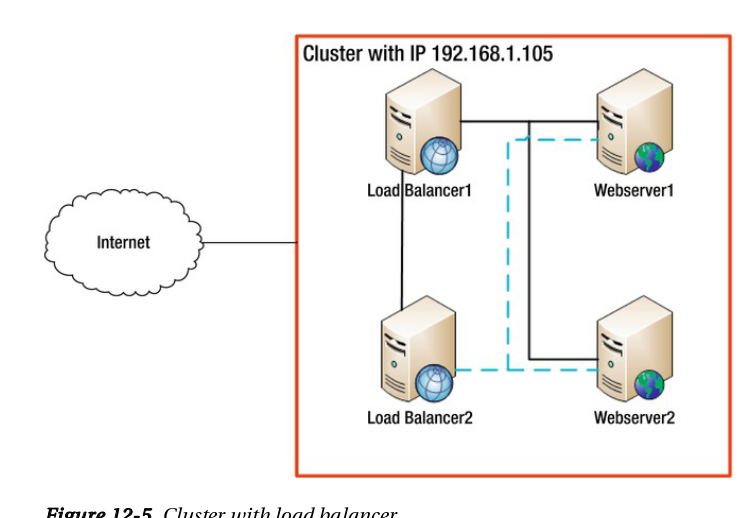
Clustering for High Availability
Load Balancing in the Cloud

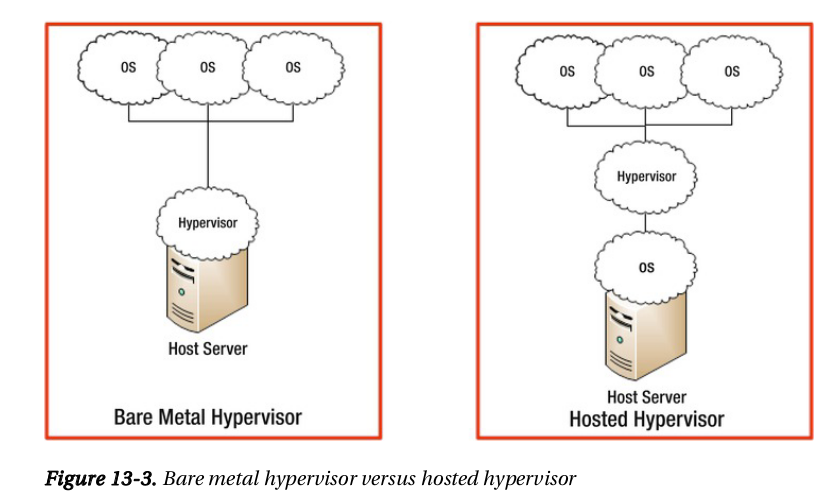
IPv6: Implications and Concepts


Nov 20, 2012
Practical Vim: Edit Text at the Speed of Thought - Drew Neil
Editing
. - repeats the last change
u - undo <C-r> - redox - deletes character under the cursor d{motion} - delete dl dd - delete current line db - deletes from the cursor’s starting position to the beginning of the word dw
diw
daw
dap
df{char}
d/{expression}

c{motion} - change

y{motion} - yank into register
A - append to the and of line
A = $a
C = c$
s = cl
S = ^C
I = ^i
o = A<CR>
O = ko

ea - append at the end of the current word
xp - transpose characters
ddp - transpose lines
yyp - duplicate line
g~{motion} - swap case
gu{motion} - to lower case
gU{motion} - to upper case
gUaw

J - join two lines

> - shift left
< - shift right
= - autoindent
gg=G - autoindent from start of file
>G - increases the indentation from the current line until the end of the file
Movement
j       | Down one real line
gj      | Down one display line
k       | Up one real line
gk      | Up one display line
0       | To first character of real line
g0      | To first character of display line
^       | To first nonblank character of real line
g^      | To first nonblank character of display line
$       | To end of real line
g$      | To end of display line
---------------------------------------
w       | Forward to start of next word
b       | Backward to start of current/previous word
e       | Forward to end of current/next word
ge      | Backward to end of previous word

gg - to the start of file
{line}G - go to line
Jump
:jumps <C-o> - to prev edition place <C-i> - to next edition place [count]G | Jump to line number //pattern <CR> /?pattern <CR> / n / N | Jump to next/previous occurrence of pattern % | Jump to matching parenthesis (/) | Jump to start of previous/next sentence {/} | Jump to start of previous/next paragraph H/M/L | Jump to top/middle/bottom of screen gf | Jump to file name under the cursor <C-]> | Jump to definition of keyword under the cursor ’{mark} / `{mark} | Jump to a markChanges
:changes g; - traverse backward through the change list g; - traverse forward through the change list see also `. and `^Selection
a) or ab | A pair of (parentheses) i) or ib | Inside of (parentheses) a} or aB | A pair of {braces} i} or iB | Inside of {braces} a] | A pair of [brackets] i] | Inside of [brackets] a> | A pair of <angle brackets> i> | Inside of <angle brackets> a’ | A pair of 'single quotes' i’ | Inside of 'single quotes' a" | A pair of "double quotes" i" | Inside of "double quotes" a` | A pair of `backticks` i` | Inside of `backticks` at | A pair of <xml>tags</xml> it | Inside of <xml>tags</xml> ---------------------------------------------------- iw | Current word aw | Current word plus one space iW | Current WORD aW | Current WORD plus one space is | Current sentence as | Current sentence plus one space ip | Current paragraph ap | Current paragraph plus one blank lineRegisters
P - paste the contents of our unnamed register in front of the cursor gp gP - leave the cursor positioned at the end of the pasted text <C-r>{register} - paste from register in Insert mode "{register} :reg "0 - content of register "" - unnamed "0 - yank "_ - black hole "+ - system "* - selection "= - expression "a-"z - named Register | Contents ----------------------------------- "% | Name of the current file "# | Name of the alternate file ". | Last inserted text ": | Last Ex command "/ | Last search patternSearch
f{char} | Forward to the next occurrence of {char} F{char} | Backward to the previous occurrence of {char} t{char} | Forward to the character before the next occurrence of {char} T{char} | Backward to the character after the previous occurrence of {char} ; | Repeat the last character-search command , | Reverse the last character-search commandMarks
m{a-zA-Z} ’{mark} Keystrokes | Buffer Contents -------------------------------------------------------------- `` | Position before the last jump within current file `. | Location of last change `^ | Location of last insertion `[ | Start of last change or yank `] | End of last change or yank `< | Start of last visual selection `> | End of last visual selection % - jump between opening and closing sets of parenthesesInsert mode
i - activate <C-h> - delete back one char <C-w> - delete back one word <C-h> - delete back to start of line <C-r>{register} - paste from register <C-a> - perform addition on numbers <C-x> - perform subtraction on numbers <C-r>= - open calculator {number}<C-a> set nrformats= this will cause vim to treat all numerals as decimal, regardless of whether they are padded with zeros.Insert unusial character
<C-v>{123} - Insert character by decimal code <C-v>u{1234} - Insert character by hexadecimal code <C-v>{nondigit} - Insert nondigit literally <C-k>{char1}{char2} - Insert character represented by {char1}{char2} digraphInsert normal mode
<C-o> - enableReplace mode
R - activateVirtual Replace mode (tab as spaces)
gR - activateVisual modes
gv - Reselect the last visual selection o - Go to other end of highlighted text vit - select inside tag U - to uppercaseCharacter-wise Visual mode
vLine-wise Visual mode
VBlock-wise Visual mode
<C-v>Command-Line mode
:[range]delete [x] | | Delete specified lines [into register x] :[range]yank [x] | | Yank specified lines [into register x] :[line]put [x] | | Put the text from register x after the specified line :[range]copy {address} | :t | Copy the specified lines to below the line specified by {address} :[range]move {address} | :m | Move the specified lines to below the line specified by {address} :[range]join | | Join the specified lines :[range]normal {commands} | | Execute Normal mode {commands} on each specified line :[range]substitute/{pattern}/{string}/[flags] | | Replace occurrences of {pattern} with {string} on each specified line :[range]global/{pattern}/[cmd] | | Execute the Ex command [cmd] on all specified lines where the {pattern} matches @: - repeat last ex command :registers <C-r><C-w> - copies the word under the cursor and inserts it at the command-line prompt <C-w> - delete backward to the start of the previous word <C-u> - delete backward to the start of the lineExamples
:1 :print :$ :p :3p :2,5p :.,$p % - all lines of file :%p :%s/Practical/Pragmatic/ :'<,'>p - visual selection :/<html>/,/<\/html>/p - range of Lines by Patterns :{address}+n - Modify an Address Using an Offset :/<html>/+1,/<\/html>/-1p :.,.+3p :%normal A; - adds semicolons to all file lines ends :%normal i// - comments all lines :col<C-d> - autosuggestions set wildmode=longest,list - like bash # like zsh: set wildmenu set wildmode=full :%s//<C-r><C-w>/g - copy word under cursor to substitute command :write | !ruby % - combine two commands with | signRanges
Symbol | Address -------|----------------------- 1 | First line of the file $ | Last line of the file 0 | Virtual line above first line of the file . | Line where the cursor is placed 'm | Line containing mark m '< | Start of visual selection '> | End of visual selection % | The entire file (shorthand for :1,$) Command | Effect ---------|------------------------------------------- :6t. | Copy line 6 to just below the current line :t6 | Copy the current line to just below line 6 :t. | Duplicate the current line (similar to Normal mode yyp ) :t$ | Copy the current line to the end of the file :'<,'>t0 | Copy the visually selected lines to the start of the file Command | Action --------------------------------------------------------------- q/ | Open the command-line window with history of searches q: | Open the command-line window with history of Ex commands ctrl-f | Switch from Command-Line mode to the command-line window Command | Effect ---------------------|--------------------------------------------- :shell | Start a shell (return to Vim by typing exit) :!{cmd} | Execute {cmd} with the shell :read !{cmd} | Execute {cmd} in the shell and insert its standard output below the cursor :[range]write !{cmd} | Execute {cmd} in the shell with [range] lines as standard input :[range]!{filter} | Filter the specified [range] through external program {filter} :2,$!sort -t',' -k2Repeat
Intent | Act | Repeat| Reverse ---------------------------------|-----------------------|-------|-------- Make a change | {edit} | . | u Scan line for next character | f{char} / t{char} | ; | , Scan line for previous character | F{char} / T{char} | ; | , Scan document for next match | /pattern <CR> | n | N Scan document for previous match | ?pattern <CR> | n | N Perform substitution | :s/target/replacement | & | u Execute a sequence of changes | qx{changes}q | @x | u * - search words under cursorFiles
:ls :bn(ext) :bprev(ious) :bdelete N1 N2 N3 :N,M bdelete <C-^> - switch back to the already editing buffer <C-g> - command echoes the name and status of the current file :args :args {arglist} :args index.html app.js :args **/*.js **/*.css :args `cat .chapters` :lcd {path} - command lets us set the working directory locally for the current window :set path? - inspect path value gf - go to file under cursor Command | Effect ---------|----------------------------------------- :w[rite] | Write the contents of the buffer to disk :e[dit]! | Read the file from disk back into the buffer (that is, revert changes) :qa[ll]! | Close all windows, discarding changes without warning :wa[ll] | Write all modified buffers to diskWindows
<C-w>s | Split the current window horizontally, reusing the current buffer in the new window <C-w>v | Split the current window vertically, reusing the current buffer in the new window :sp[lit] {file} | Split the current window horizontally, loading {file} into the new window :vsp[lit] {file} | Split the current window vertically, loading {file} into the new window Command | Effect ------------------------------------ <C-w>w | Cycle between open windows <C-w>h | Focus the window to the left <C-w>j | Focus the window below <C-w>k | Focus the window above <C-w>l | Focus the window to the right Ex Command | Normal | Command Effect --------------------------------------------- :cl[ose] | <C-w>c | Close the active window :on[ly] | <C-w>o | Keep only the active window, closing all others Keystrokes | Buffer Contents ----------------------------------------------------- <C-w>= | Equalize width and height of all windows <C-w>_ | Maximize height of the active window <C-w>| | Maximize width of the active window [N]<C-w>_ | Set active window height to [N] rows [N]<C-w>| | Set active window width to [N] columnsTabs
Command | Effect ---------------------------------------------------- :tabe[dit] {filename} | Open {filename} in a new tab <C-w>T | Move the current window into its own tab :tabc[lose] | Close the current tab page and all of its windows :tabo[nly] | Keep the active tab page, closing all others Ex Command | Normal Command | Effect --------------------------------------------------------------- :tabn[ext] {N} | {N}gt | Switch to tab page number {N} :tabn[ext] | gt | Switch to the next tab page :tabp[revious] | gT | Switch to the previous tab page :tabmove [N] - rearrange tabsRecipies
Open Files and Save Them to Disk
:pwd :edit lib/framework.js :edit % <Tab> - % symbol is a shorthand for the filepath of the active buffer :edit %:h <Tab> - :h modifier removes the filename while preserving the rest of the pathSave files to nonexistent directories:
:!mkdir -p %:h :writeSave a file as the super user
:w !sudo tee % > /dev/null :find Main.js :set path+=app/**netrw
set nocompatible filetype plugin on Ex Command | Shorthand | Effect ------------------------------------------------------------------------- :edit . | :e. | Open file explorer for current working directory :Explore | :E | Open file explorer for the directory of the active bufferPlugins
https://github.com/tpope/vim-commentary \\ap \\G \\\ - comment current line https://github.com/kana/vim-textobj-entire http://github.com/tpope/vim-surround - !!! Surround.vim p.129Settings
:set shiftwidth=4 softtabstop=4 expandtab
Sep 6, 2012
Lean-Agile Acceptance Test-Driven Development. Better Software Through Collaboration - Pugh K. - 2011
Although acceptance testing has been around for a long time, it was reinvigorated by extreme programming. Its manifestations include ATDD as described in this book, example-driven development (EDD) by Brian Marick, behavior-driven development (BDD) by Dan North, story test-driven development (SDD) by Joshua Kerievsky of Industrial Logic, domain-driven design (DDD) by Eric Evans, and executable acceptance test-driven development (EATDD)


- Creation through the user interface of a transaction that invokes the business rule
- Development of a user interface that directly invokes the business rule
- A unit test implemented in a language’s unit testing framework
- An automated test that communicates with the business rule module
- The structure of a test is
- Given <setup>
- When <action or event>
- Then <expected results>
- For calculation tests, the structure is
- Given <input>
- When <computation occurs>
- Then <expected results>
- Following are three types of tables:
- Calculation—Gives result for particular input
- Data—Gives data that should exist (or be created if necessary)
- Action—Performs some action
- Create a test for each exception and alternative in a use case.
- Do not automate everything.
- Run tests at multiple levels.
- Create a working system early to check against objectives.
- When creating and implementing tests, consider the following:
- Develop tests and automation separately. Understand the test first, and then explore how to automate it.
- Automate the tests so that they can be part of a continuous build.
- Don’t put test logic in the production code. Tests should be completely separate from the production code.
- As much as practical, cover 100% of the functional requirements in the acceptance tests.
In structuring tests, remember the following:
- Tests should follow the Given-When-Then or the Arrange-Act-Assert.
- Keep tests simple.
- Only have the essential detail in a test.
- Avoid lots of input and output columns. Break large tables into smaller ones, or show common values in the headers.
- Avoid logic in tests.
- Describe the intent of the test, not just a series of steps.

- Equivalence partitioning, which divides inputs into groups that should exhibit similar behavior.
- Boundary value analysis, which tests values at the edge of each equivalence partition.
- State transition testing checks the response from a system that depends on its state.
- Use case testing to check all paths through a use case.
- Decision table testing for complex business rules. Often, the decision table is presented in the opposite format, where rows and columns are interchanged from the format used in this book.
- Who—The triad—customer, developer, and tester communicating and
- collaborating
- What—Acceptance criteria for projects and features, acceptance tests for
- stories
- When—Prior to implementation—either in the iteration before or up to
- one second before, depending on your environment
- Where—Created in a joint meeting, run as part of the build process
- Why—To effectively build high-quality software and to cut down the
- amount of rework
- How—In face-to-face discussions, using Given/When/Then and examples
Framework Websites
JBehave http://jbehave.org/Fit http://fit.c2.com/
FitNesse http://fitnesse.org/
Easyb http://www.easyb.org/
Cucumber http://cukes.info
Robot http://code.google.com/p/robotframework/
Arbiter http://arbiter.sourceforge.net/
Concordian http://www.concordion.org/
Selenium http://seleniumhq.org
Watir http://watir.com/
Other frameworks at: http://www.opensourcetesting.org/functional.php
http://www.acceptancetestdrivendevelopment.com/
Aug 3, 2012
Learn Python The Hard Way - Zed A Shaw - 2010
Function Style
All the other rules I’ve taught you about how to make a function nice apply here, but add these things:
All the other rules I’ve taught you about how to make a function nice apply here, but add these things:
- For various reasons, programmers call functions that are part of classes methods. It’s mostly marketing but just be warned that every time you say “function” they’ll annoyingly correct you and say “method”. If they get too annoying, just ask them to demonstrate the mathematical basis that determines how a “method” is different from a “function” and they’ll shut up.
- When you work with classes much of your time is spent talking about making the class “do things”. Instead of naming your functions after what the function does, instead name it as if it’s a command you are giving to the class. Same as pop is saying “Hey list, pop this off.” It isn’t called remove_from_end_of_list because even though that’s what it does, that’s not a command to a list.
- Keep your functions small and simple. For some reason when people start learning about classes they forget this.
- Your class should use “camel case” like SuperGoldFactory rather than super_gold_factory.
- Try not to do too much in your __init__ functions. It makes them harder to use.
- Your other functions should use “underscore format” so write my_awesome_hair and not myawesomehair or MyAwesomeHair.
- Be consistent in how you organize your function arguments. If your class has to deal with users, dogs, and cats, keep that order throughout unless it really doesn’t make sense. If you have one function takes (dog, cat, user) and the other takes (user, cat, dog), it’ll be hard to use.
- Try not to use variables that come from the module or globals. They should be fairly self-contained.
- A foolish consistency is the hobgoblin of little minds. Consistency is good, but foolishly following some idiotic mantra because everyone else does is bad style. Think for yourself.
- Always, always have class Name(object) format or else you will be in big trouble.
- Give your code vertical space so people can read it. You will find some very bad programmers who are able to write reasonable code, but who do not add any spaces. This is bad style in any language because the human eye and brain use space and vertical alignment to scan and separate visual elements. Not having space is the same as giving your code an awesome camouflage paint job.
- If you can’t read it out loud, it’s probably hard to read. If you are having a problem making something easy to use, try reading it out loud. Not only does this force you to slow down and really read it, but it also helps you find difficult passages and things to change for readability.
- Try to do what other people are doing in Python until you find your own style.
- Once you find your own style, do not be a jerk about it. Working with other people’s code is part of being a programmer, and other people have really bad taste. Trust me, you will probably have really bad taste too and not even realize it.
- If you find someone who writes code in a style you like, try writing something that mimics their style.
Good Comments
- There are programmers who will tell you that your code should be readable enough that you do not need comments. They’ll then tell you in their most official sounding voice that, “Ergo you should never write comments.” Those programmers are either consultants who get paid more if other people can’t use their code, or incompetents who tend to never work with other people. Ignore them and write comments.
- When you write comments, describe why you are doing what you are doing. The code already says how, but why you did things the way you did is more important.
- When you write doc comments for your functions, make the comments documentation for someone who will have to use your code. You do not have to go crazy, but a nice little sentence about what someone does with that function helps a lot.
- Finally, while comments are good, too many are bad, and you have to maintain them. Keep your comments relatively short and to the point, and if you change a function, review the comment to make sure it’s still correct.
Expert Python Programming: Best practices for designing, coding, and distributing your Python software - Tarek Ziadé - 2008
context, contextlib http://www.doughellmann.com/PyMOTW/contextlib/index.html
Multiple Inheritance Best Practices
__mro__: If __mro__ is available, have a quick look at the code of the constructor of each class involved in the MRO. If super is used everywhere, it is super! You can use it. If not, try to be consistent.
__slots__ : An interesting feature that is almost never used by developers is slots. They allow you to set a static attribute list for a given class with the __slots__ attribute, and skip the creation of the __dict__ list in each instance of the class. They were intended to save memory space for classes with a very few attributes, since __dict__ is not created at every instance.
The latter can be avoided with the "-O" option of the interpreter. In that case, all assertions are removed from the code before the byte code is created, so that the checking is lost.
Anyhow, many DbC libraries exist in Python for people that are fond of it. You can have a look at Contracts for Python.
Another approach towards this is "fuzz testing", where random pieces of data are sent to the program to detect its weaknesses. When a new defect is found, the code can be fixed to take care of that, together with a new test.
The warnings module will warn the user on the first call and will ignore the next calls. Another nice feature about this module is that filters can be created to manage warnings that are impacting the application. For example, warnings can be automatically ignored or turned into exceptions to make the changes mandatory. See http://docs.python.org/lib/warning-filter.html http://docs.python.org/library/warnings.html#available-functions http://django-notes.blogspot.com/2012/05/deprecationwarning-django-14.html
The web location used to find the package is the same as that used by easy_install is http://pypi.python.org/simple, which is a web page not intended for humans that contains a list of package links that can be browsed automatically.
dia
autodia -l python -f manage.py
autodia -l python -d apps/integrations/salesforce/ -r
Munin is a great system-monitoring tool that you can use to get a snapshot of the system health.
Gprof2Dot can be used to turn profiler data into a dot graph. You can download this simple script from http://jrfonseca.googlecode.com/svn/trunk/gprof2dot/gprof2dot.py and use it on the stats as long as Graphviz is installed in your box
KcacheGrind is also a great vizualization tool to display profile data.
The PyMetrics project from Reg Charney provides a nice script to calculate the cyclomatic complexity
The Twisted framework, which comes with a callback-based programming philosophy, has ready-to-use patterns for server programming. Last, eventlet is another interesting approach, probably simpler than Twisted.
Code Simplicity - Max Kanat-Alexander - 2012
Fact: The difference between a bad programmer and a good programmer is understanding. That is, bad programmers don’t understand what they are doing, and good programmers do.
Rule: A “good programmer” should do everything in his power to make what he writes as simple as possible to other programmers.
Definition: A program is:
Fact: Everybody who writes software is a designer.
Rule: Design is not a democracy. Decisions should be made by individuals.
Fact: There are laws of software design, they can be known, and you can know them. They are eternal, unchanging, and fundamentally true, and they work.
Law: The purpose of software is to help people.
Fact: The goals of software design are:
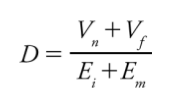
This is the Primary Law of Software Design. Or, in English:
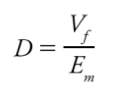
Which demonstrates that it is more important to reduce the effort of maintenance than it is to reduce the effort of implementation.
Rule: The quality level of your design should be proportional to the length of future time in which your system will continue to help people.
Rule: There are some things about the future that you do not know.
Fact: The most common and disastrous error that programmers make is predicting something about the future when in fact they cannot know.
Rule: You are safest if you don’t attempt to predict the future at all, and instead make all your design decisions based on immediately known present-time information.
Law: The Law of Change: The longer your program exists, the more probable it is that any piece of it will have to change.
Fact: The three mistakes (called “the three flaws” in this book) that software designers are prone to making in coping with the Law of Change are:
Rule: Code should be designed based on what you know now, not on what you think will happen in the future.
Fact: When your design actually makes things more complex instead of simplifying things, you’re overengineering.
Rule: Be only as generic as you know you need to be right now.
Rule: You can avoid the three flaws by doing incremental development and design.
Law: The Law of Defect Probability: The chance of introducing a defect into your program is proportional to the size of the changes you make to it.
Rule: The best design is the one that allows for the most change in the environment with the least change in the software.
Rule: Never “fix” anything unless it’s a problem, and you have evidence showing that the problem really exists.
Rule: In any particular system, any piece of information should, ideally, exist only once.
Law: The Law of Simplicity: The ease of maintenance of any piece of software is proportional to the simplicity of its individual pieces.
Fact: Simplicity is relative.
Rule: If you really want to succeed, it is best to be stupid, dumb simple.
Rule: Be consistent.
Rule: Readability of code depends primarily on how space is occupied by letters and symbols.
Rule: Names should be long enough to fully communicate what something is or does without being so long that they become hard to read.
Rule: Comments should explain why the code is doing something, not what it is doing.
Rule: Simplicity requires design.
Rule: You can create complexity by:
Rule: Often, if something is getting very complex, that means there is an error in the design somewhere below the level where the complexity appears.
Rule: When presented with complexity, ask, “What problem are you trying to solve?”
Rule: Most difficult design problems can be solved by simply drawing or writing them out on paper.
Rule: A “good programmer” should do everything in his power to make what he writes as simple as possible to other programmers.
Definition: A program is:
- A sequence of instructions given to the computer
- The actions taken by a computer as the result of being given instructions
Fact: Everybody who writes software is a designer.
Rule: Design is not a democracy. Decisions should be made by individuals.
Fact: There are laws of software design, they can be known, and you can know them. They are eternal, unchanging, and fundamentally true, and they work.
Law: The purpose of software is to help people.
Fact: The goals of software design are:
- To allow us to write software that is as helpful as possible
- To allow our software to continue to be as helpful as possible
- To design systems that can be created and maintained as easily as possible by their programmers, so that they can be—and continue to be—as helpful as possible
This is the Primary Law of Software Design. Or, in English:
The desirability of a change is directly proportional to the value now plus the future value, and inversely proportional to the effort of implementation plus the effort of maintenance.As time goes on, this equation reduces to:
Which demonstrates that it is more important to reduce the effort of maintenance than it is to reduce the effort of implementation.
Rule: The quality level of your design should be proportional to the length of future time in which your system will continue to help people.
Rule: There are some things about the future that you do not know.
Fact: The most common and disastrous error that programmers make is predicting something about the future when in fact they cannot know.
Rule: You are safest if you don’t attempt to predict the future at all, and instead make all your design decisions based on immediately known present-time information.
Law: The Law of Change: The longer your program exists, the more probable it is that any piece of it will have to change.
Fact: The three mistakes (called “the three flaws” in this book) that software designers are prone to making in coping with the Law of Change are:
- Writing code that isn’t needed
- Not making the code easy to change
- Being too generic
Rule: Code should be designed based on what you know now, not on what you think will happen in the future.
Fact: When your design actually makes things more complex instead of simplifying things, you’re overengineering.
Rule: Be only as generic as you know you need to be right now.
Rule: You can avoid the three flaws by doing incremental development and design.
Rule: The best design is the one that allows for the most change in the environment with the least change in the software.
Rule: Never “fix” anything unless it’s a problem, and you have evidence showing that the problem really exists.
Rule: In any particular system, any piece of information should, ideally, exist only once.
Law: The Law of Simplicity: The ease of maintenance of any piece of software is proportional to the simplicity of its individual pieces.
Fact: Simplicity is relative.
Rule: If you really want to succeed, it is best to be stupid, dumb simple.
Rule: Be consistent.
Rule: Readability of code depends primarily on how space is occupied by letters and symbols.
Rule: Names should be long enough to fully communicate what something is or does without being so long that they become hard to read.
Rule: Comments should explain why the code is doing something, not what it is doing.
Rule: Simplicity requires design.
Rule: You can create complexity by:
- Expanding the purpose of your software
- Adding programmers to the team
- Changing things that don’t need to be changed
- Being locked into bad technologies
- Misunderstanding
- Poor design or no design
- Reinventing the wheel
- Violating the purpose of your software
Rule: Often, if something is getting very complex, that means there is an error in the design somewhere below the level where the complexity appears.
Rule: When presented with complexity, ask, “What problem are you trying to solve?”
Rule: Most difficult design problems can be solved by simply drawing or writing them out on paper.
Rule: To handle complexity in your system, redesign the individual pieces in small steps.
Fact: The key question behind all valid simplifications is, “How could this be easier to deal with or more understandable?”
Rule: If you run into an unfixable complexity outside of your program, put a wrapper around it that is simple for other programmers.
Rule: Rewriting is acceptable only in a very limited set of situations.
Law: The Law of Testing: The degree to which you know how your software behaves is the degree to which you have accurately tested it.
Rule: Unless you’ve tried it, you don’t know that it works.
Fact: The key question behind all valid simplifications is, “How could this be easier to deal with or more understandable?”
Rule: If you run into an unfixable complexity outside of your program, put a wrapper around it that is simple for other programmers.
Rule: Rewriting is acceptable only in a very limited set of situations.
Law: The Law of Testing: The degree to which you know how your software behaves is the degree to which you have accurately tested it.
Rule: Unless you’ve tried it, you don’t know that it works.
Jul 13, 2012

Jun 17, 2012
Growing Object-Oriented Software, Guided by Tests by Steve Freeman and Nat Pryce

Levels of Testing
- Acceptance: Does the whole system work?
- Integration: Does our code work against code we can't change?
- Unit: Do our objects do the right thing, are they convenient to work with?
 Unit and integration tests support the development team, should run quickly, and should always pass. Acceptance tests for completed features catch regressions and should always pass, although they might take longer to run.
Refactoring is not the same activity as redesign, where the programmers take a conscious decision to change a large-scale structure.That said, having taken a redesign decision, a team can use refactoring techniques to get to the new design incrementally and safely.
We have objects sending each other messages, so what do they say? Our experience is that the calling object should describe what it wants in terms of the role that its neighbor plays, and let the called object decide how to make that happen. This is commonly known as the “Tell, Don’t Ask” style or, more formally, the Law of Demeter. Objects make their decisions based only on the information they hold internally or that which came with the triggering message; they avoid navigating to other objects to make things happen. Followed consistently, this style produces more flexible code because it’s easy to swap objects that play the same role.
We also prefer not to change third-party code, even when we have the sources. It’s usually too much trouble to apply private patches every time there’s a new version.Test code should describe what the production code does. That means that it tends to be concrete about the values it uses as examples of what results to expect, but abstract about how the code works. Production code, on the other hand, tends to be abstract about the values it operates on but concrete about how it gets the job done.

A better alternative is to name tests in terms of the features that the target object provides. We use a TestDox convention (invented by Chris Stevenson) where each test name reads like a sentence, with the target class as the implicit subject

We try to move everything out of the test method that doesn’t contribute to the description, in domain terms, of the feature being exercised
Literal values without explanation can be difficult to understand because the programmer has to interpret whether a particular value is significant (e.g. just outside the allowed range) or just an arbitrary placeholder to trace behavior (e.g. should be doubled and passed on to a peer)

The assertions and expectations of a test should communicate precisely what matters in the behavior of the target code
The code to create all these objects makes the tests hard to read, filling them with information that doesn’t contribute to the behavior being tested. It also makes tests brittle, as changes to the constructor arguments or the structure of the objects will break many tests. The object mother pattern [Schuh01] is one attempt to avoid this problem. An object mother is a class that contains a number of factory methods [Gamma94] that create objects for use in tests.

We think a bit harder about what varies between tests and what is common, and realize that a better alternative is to pass the builder through, not its arguments; it’s similar to when we started combining builders.
If, for example, a collaboration doesn’t work properly and returns a wrong value, an assertion might fail before any expectations are checked. This would produce a failure report that shows, say, an incorrect calculation result rather than the missing collaboration that actually caused it
Allow Queries; Expect Commands
There are two ways a test can observe the system: by sampling its observable state or by listening for events that it sends out. Of these, sampling is often the only option because many systems don’t send any monitoring events
Put the Timeout Values in One Place

write events to log file and assert is it contains p.318

Subscribe to:
Posts (Atom)